

Drupal Canvas: A New Era of Visual Page Creation
Drupal has long been a powerful content management system favored by large organizations. However, the processes of creating and editing pages have often required a certain level of technical expertise.

Drupal has long been a powerful content management system favored by large organizations. However, the processes of creating and editing pages have often required a certain level of technical expertise. Drupal Canvas changes this by transforming page creation into a more visual and intuitive experience. As a result, it offers a more accessible and efficient working environment for both content teams and developers.
In this section, we will examine Canvas’s interface, its core features, and the contributions it makes to the user experience. We will also touch on the future opportunities it offers within the Drupal ecosystem.
What Is Drupal Canvas and Why Is It Important?
Drupal Canvas is a tool within the Drupal ecosystem that enhances page creation and content management both visually and functionally. Content managers with limited coding knowledge can independently design their pages using a drag-and-drop interface and publish them safely with preview and undo features. Developers, on the other hand, can continue to implement technical customizations through modular components and Drupal APIs. In this way, Canvas preserves Drupal’s powerful and flexible architecture while making the page creation process faster, more accessible, and more user-centric for everyone. In addition, Canvas adopts a community-driven approach and continues to evolve through ongoing feedback and improvements.
Intuitive Page Layout for Content Managers
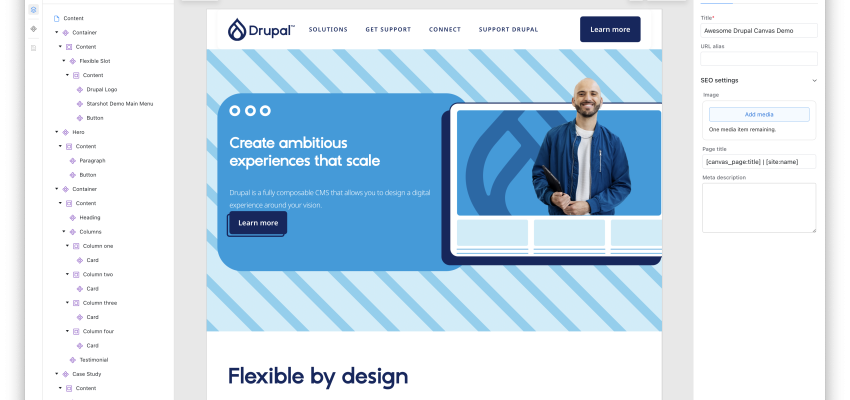
Drupal Canvas offers an intuitive interface that enables content managers to handle page design without the need for technical knowledge. Components can be easily added and arranged using drag-and-drop, and changes can be previewed instantly. As shown in the visual below, the left panel (Layers) displays the page structure, while the preview area brings your edits to life in real time. Thanks to this intuitive setup, content managers can focus fully on design.
Drupal Canvas Toolbar and Panels
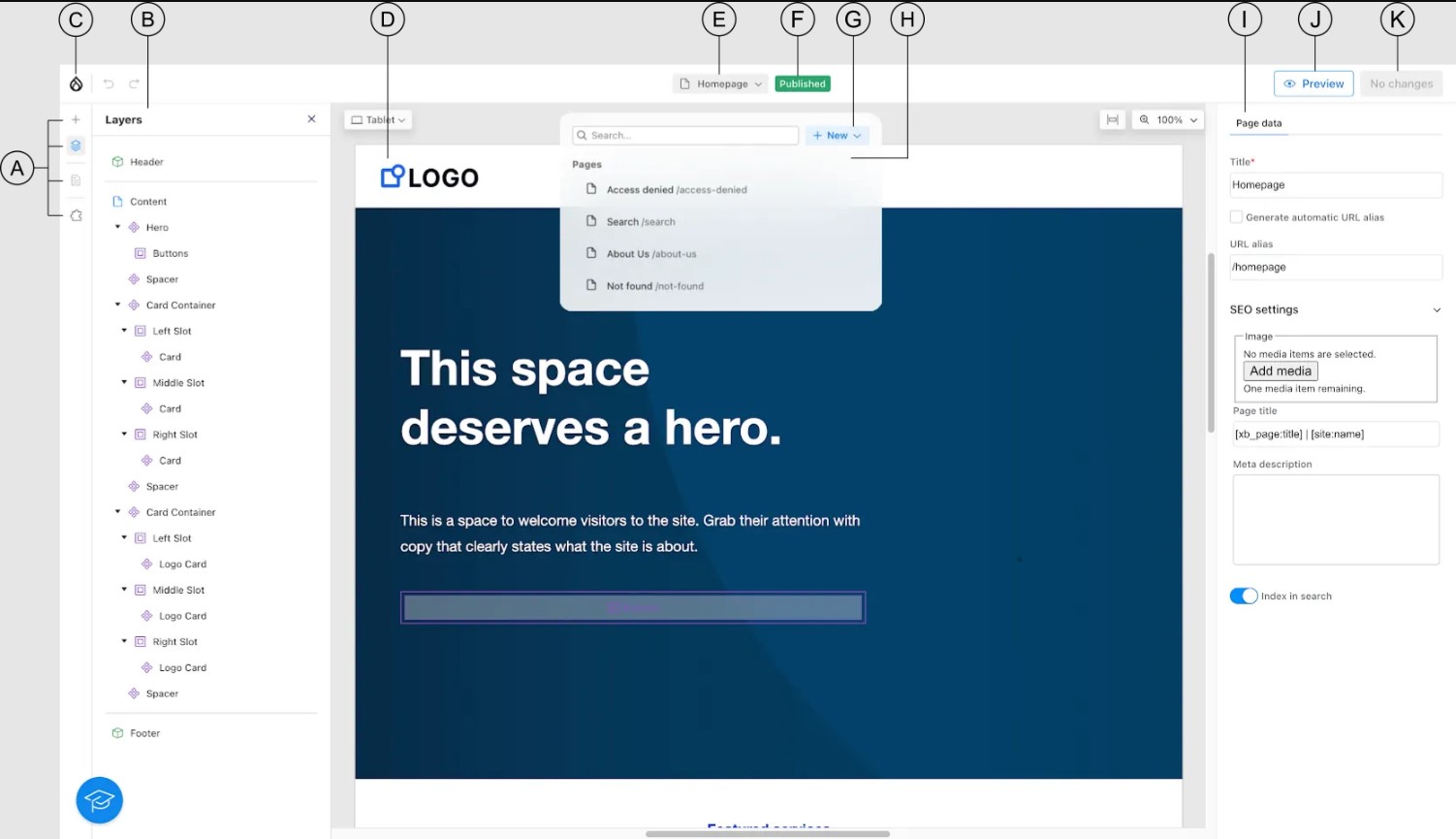
A – Add
When you click this icon, Drupal Canvas opens the Library panel in the left sidebar. From here, you can access site-specific elements that can be added to your page.
Library Panel Sections:
- Patterns: Preconfigured sets of components (hero sections, multi-column layouts, etc.).
- Components: Specific building blocks that can be used on the page.
- Code: Components that are not added to the library; either not ready-made or used to build other components.
Overrides: Options for customizing the appearance of dynamic components provided by the CMS.
B – Left Sidebar Panel
Displays the panel related to the selected tool in the left sidebar.
C – Exit
Used to close the Drupal Canvas user interface.
D – Preview Area
Shows a preview of the page. You can scroll through the page using the mouse wheel, and zoom in or out by holding ⌘ Command on Mac or Ctrl on Windows while scrolling.
E – Page Title
Displays the title of the current page. By clicking the title, you can open the Navigator, switch to other pages, or create new content.
F – Publishing Status
Shows the publishing status of the page:
- Draft: The page is not published.
- Published: The page is published and unchanged.
- Changed: The page is published and has been modified.
G – New
Used to create new content.
H – Navigator
Helps you navigate to other pages within the site.
I – Right Sidebar
Allows you to configure page settings.
J – Preview
Used to check how the page will look when published.
K – Review Changes
Allows you to review the changes that will be published. After confirming the changes, you can publish the page.
Flexible and Modular Architecture for Developers
Drupal Canvas enables developers to work seamlessly with the existing Drupal infrastructure. Thanks to its modular component-based architecture, users with coding expertise can customize page elements, create reusable components, and add more advanced functionality through API integrations. This structure allows developers to manage and customize pages in a fast yet sustainable way, while also supporting the independent work of content teams.
User Experience and Preview Advantages
- Canvas gives both content managers and developers the ability to see the final state of a page in real time.
- Changes are displayed instantly, and thanks to the multi-step undo feature, errors can be corrected easily.
- This approach speeds up the content creation process and improves the overall user experience.
- Being able to see how pages will look before publishing helps ensure quality and accuracy.
Overview of the Drupal Canvas Interface
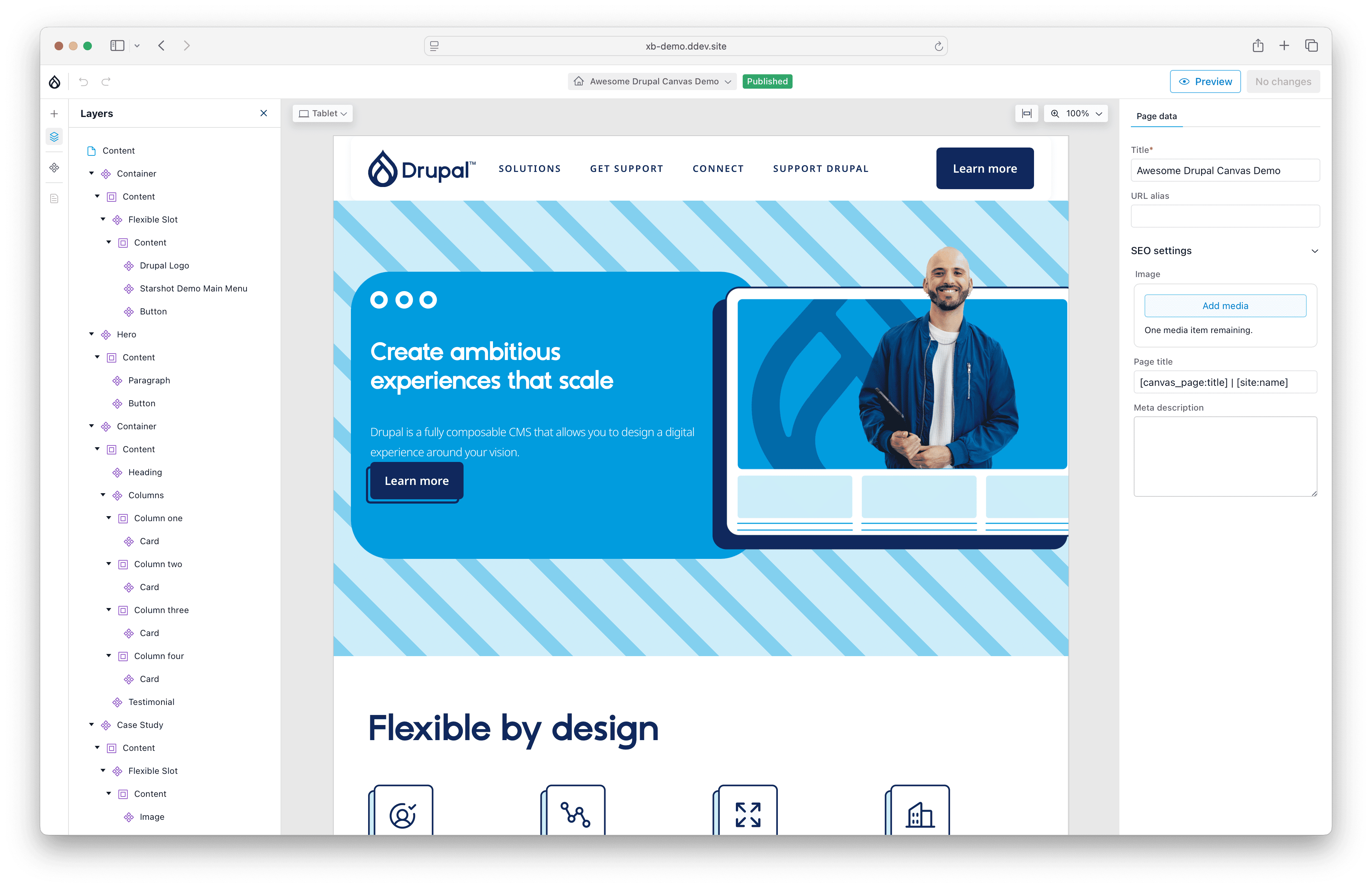
This demo image shows the Drupal Canvas user interface. You can select components from the left panel and add them to the page, instantly view your changes in the preview area, and easily configure page settings from the right panel. The interface is designed to be intuitive and user-friendly for both content managers and developers; even with limited technical knowledge, the page creation and editing process remains fast and efficient.
Drupal Canvas 1.0 Features
- Drag-and-Drop Interface: You can add and arrange page components quickly and intuitively.
- Component Library: Prebuilt components, patterns, and modules speed up the page design process.
- Preview Area: Instantly see your changes and review the final version of the page before publishing.
- Undo and Multi-Step Editing: Errors can be easily undone, allowing you to work safely across multiple changes.
- Modular and Flexible Structure: Developers can customize pages freely using APIs and custom components.
- Page Publishing Status Management: You can view and manage page states such as draft, published, or modified.
- Community-Driven Development: An open-source platform that continuously evolves through community feedback.
The Future with Drupal Canvas
Drupal Canvas not only enhances today’s page-building experience but also presents a forward-looking vision for the Drupal ecosystem. With more intuitive interfaces, modular components, and community-driven development, content management and page design are becoming increasingly accessible, faster, and more user-friendly.