

Matomo 5.6.0 Released: AI Agent Tracking, Privacy Updates, and New Features
Matomo 5.6.0 has been released! With this update, you can manage your website’s analytics data more accurately and distinguish AI-generated traffic from human traffic thanks to AI Agent tracking. In addition, site-specific privacy settings and user experience improvements strengthen your GDPR/KVKK compliance while making dashboard usage more comfortable. In this article, you can find a step-by-step overview of what’s new in Matomo 5.6.0, AI Agent tracking, privacy settings, and the update guide.


What Is Matomo 5.6.0?
The AI Agent Tracking feature introduced with Matomo 5.6.0 allows you to distinguish AI-based agents visiting your website from human user traffic. Its main benefits include:
- Detecting AI agents that visit your website (e.g., ChatGPT, NovaAct Agent Mode).
- Tracking AI-generated requests in separate segments, enabling more accurate data analysis.
- Comparing AI Agent traffic with human traffic to understand the impact of automated activity on site performance.
- Making it much easier to optimize reports and develop data-driven strategies.
New Features and Interface Improvements in Matomo 5.6.0
| Improvement / Enhancement | Description | Benefit |
| AI Agent Tracking | AI agents such as ChatGPT and NovaAct are separated from human traffic and tracked in separate segments. | You can compare AI and human traffic, resulting in more accurate reports. |
| Privacy and Anonymization | Site-specific privacy settings can be applied, increasing GDPR/KVKK compliance. | Separate privacy policies for each site enable more secure data management. |
| Interface Improvements | Improvements have been made to modals and Ajax loaders, as well as to the segment editor and keyboard navigation. | The user experience is consistent and more efficient across all screen sizes. |
| Reporting and Analytics | AI Agent and human traffic can be compared; custom dimensions and URL parameters have been optimized. | Analytics are more comprehensive and can be used for strategic decision-making. |
What Is AI Agent Tracking (Artificial Intelligence Traffic Tracking)?
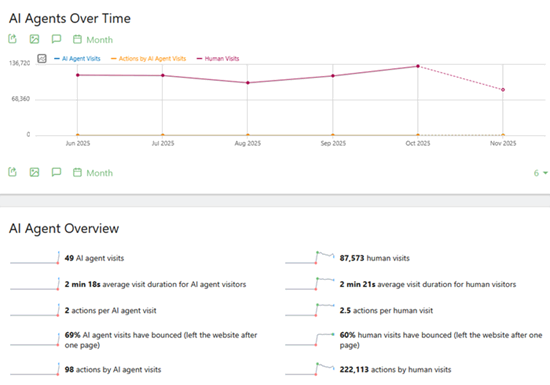
AI Agent Tracking is a feature that allows you to distinguish visits to your website or application as either human users or automated traffic generated by artificial intelligence. With the AIAgents plugin introduced in Matomo 5.6.0, requests using AI Agent modes—such as ChatGPT or NovaAct—are detected, labeled as “AI Agents,” and compared with human visits. This enables you to understand, report, and analyze how automated activities differ from human behavior, making it especially useful for large-scale websites and applications with high levels of AI-driven traffic.
How to Enable the AI Agents Plugin (Cloud and On-Premise)
The AIAgents plugin is required to track AI Agent traffic. It is automatically enabled in new Matomo Cloud and On-Premise installations, but for existing On-Premise setups, you need to activate it manually. Here are the steps:
- Log in to the Admin Panel: Sign in to Matomo using an administrator account.
- Go to the Plugins Menu: Click the Administration icon in the top-left corner.
- Manage Plugins: From the menu, select Plugins → Manage Plugins.
- Find the AIAgents Plugin: Locate the AIAgents plugin in the list.
- Activate: Click the Activate button next to the plugin.
- Verify: Once activated, AI visits will start appearing in separate segments, allowing you to compare them with human traffic in your reports.
Matomo 5.6.0 Update / Upgrade Guide
Upgrading to the latest version of Matomo, 5.6.0, is important to take advantage of new features and improvements. Before updating, you should check that your system is compatible with version 5.6.0. Matomo 5.6.0 is compatible with PHP 8.5, and the MySQL version is verified through adapter-specific checks; therefore, make sure your PHP and MySQL versions meet the recommended requirements. Also, do not forget to back up your database and files before proceeding. For Cloud users, the update is usually performed automatically, while On-Premise installations require manual steps. The steps are as follows:
Backup: Safely back up your existing database and Matomo files.
Download Update Files: Download version 5.6.0 from the official Matomo website.
Upload Files: Upload the new version over the existing Matomo files; do not modify the configuration files.
Update via Admin Panel: Open the Matomo admin panel in your browser; if an update notification appears, follow it and click the Update button.
Plugin Check: Verify the compatibility of plugins such as AIAgents and re-enable them if necessary.
Testing: After the update is complete, test your reports and core functionalities to ensure everything works smoothly.